Test version 0.2.4
BitDesk interface and remote engine 0.2.4 for testing on authorized computers. Browser access requires the MeshCentral agent to be installed separately; the current macOS flow refuses it.
 BITDESK
BitDesk
Packages are available for Windows, macOS, and Linux. Check compatibility before installing.
BitDesk interface and remote engine 0.2.4 for testing on authorized computers. Browser access requires the MeshCentral agent to be installed separately; the current macOS flow refuses it.
Choose your computer system
Choose your computer systemBitDesk 0.2.4 test release. Canonical 9-digit ID, signed presence migration and Ed25519 updater. MeshCentral agent is not bundled. Windows may warn that the app is unsigned; check the hash before opening.
Download appTest version 0.2.4 · Version 0.2.4 · 26.8 MB · Updated 2026-11-22SHA-256: 52283a7bdb40ad1e46516167d9fadbab25872b39497f0280381879b3b2cc5cdb
BitDesk 0.2.4 test release. Canonical 9-digit ID, signed presence migration and Ed25519 updater. MeshCentral agent is not bundled. Windows may warn that the app is unsigned; check the hash before opening.
Download appTest version 0.2.4 · Version 0.2.4 · 27.3 MB · Updated 2026-11-22SHA-256: cd74318ecdc38cb45922d82b7f187e5e92ea3f8ba8a9694db4ac949241f89067
BitDesk 0.2.4 test release. Canonical 9-digit ID, signed presence migration and Ed25519 updater. MeshCentral agent is not bundled. On Mac, right-click and choose Open.
Download appTest version 0.2.4 · Version 0.2.4 · 41.5 MB · Updated 2026-11-22SHA-256: fdab6bf0ac6d43db4dd4c714a860f6547ad92218c5205cc0e3594a6c014ef6f9
BitDesk 0.2.4 test release. Canonical 9-digit ID, signed presence migration and Ed25519 updater. MeshCentral agent is not bundled. On Mac, right-click and choose Open.
Download appTest version 0.2.4 · Version 0.2.4 · 92.0 MB · Updated 2026-11-22SHA-256: 26216bc31c69b587576de7cfe287ca7801a263f51afcddaa3487da7f50c336fb
BitDesk 0.2.4 test release. Canonical 9-digit ID, signed presence migration and Ed25519 updater. MeshCentral agent is not bundled. On Mac, right-click and choose Open.
Download appTest version 0.2.4 · Version 0.2.4 · 41.5 MB · Updated 2026-11-22SHA-256: 76fe01c265c417ebd1d1ef028ee30d71332bcf7fb0185aad6cdded5008644ef4
BitDesk 0.2.4 test release. Canonical 9-digit ID, signed presence migration and Ed25519 updater. MeshCentral agent is not bundled. On Mac, right-click and choose Open.
Download appTest version 0.2.4 · Version 0.2.4 · 46.3 MB · Updated 2026-11-22SHA-256: faeb0b41435b93c9394b615d5889e6d9e3388939af2e9d1a376dee500d342632
BitDesk 0.2.4 test release. Canonical 9-digit ID, signed presence migration and Ed25519 updater. MeshCentral agent is not bundled.
Download appTest version 0.2.4 · Version 0.2.4 · 28.6 MB · Updated 2026-11-22SHA-256: 49e38947f56f12aaad89ff5e13b9b3376f4677e8ae19737449e164a7d502bb0c
Windows x64 (EXE) 0.2.3 Windows x64 (MSI) 0.2.3 macOS Intel (PKG) 0.2.3 macOS Intel (DMG) 0.2.3 macOS Apple Silicon (PKG) 0.2.3 macOS Apple Silicon (DMG) 0.2.3 Linux x64 (DEB) 0.2.3 Android ARM64 APK 0.2.3
win-x64.exe 0.2.2 win-x64.msi 0.2.2 macos-x86_64.pkg 0.2.2 macos-x86_64.dmg 0.2.2 macos-arm64.pkg 0.2.2 macos-arm64.dmg 0.2.2 linux-amd64.deb 0.2.2 android-arm64.apk 0.2.2
Source code and licenses (AGPL-3.0)
On Mac, allow Screen Recording and Accessibility to receive access in the app. Browser access is unavailable in the current macOS flow.
BitDesk
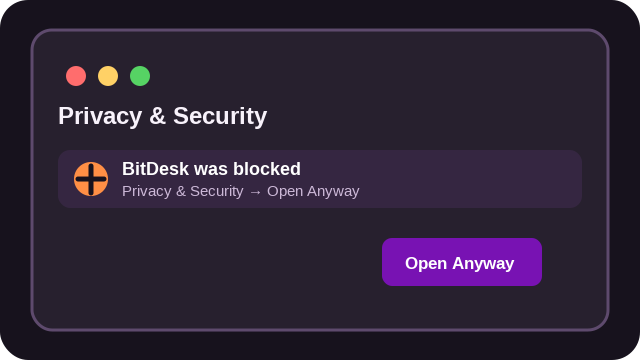
Open System Settings → Privacy & Security and click Open Anyway. Confirm opening BitDesk once more.
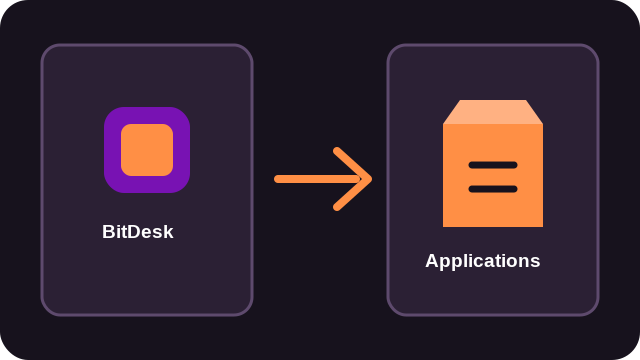
Install-free alternative: open the DMG, drag BitDesk to Applications, then right-click → Open.